OpenSCAD pure shapes approximation
Introduction
This processor provides you a way to manually approximate your robot into pure shapes.
You can follow the following video tutorial. Some of the steps are outdated, but the general idea is still the same.
Requirements
For this processor to work, you need to install the OpenSCAD package:
sudo apt-get install openscad
Process
When the OpenSCAD processor is enabled (see below), it will check for the presence of .scad files in the output directory. If some are present, they will be parsed and pure shapes will be exported.
Note
By default, exporters will use pure shapes for collisions instead of meshes.
You can use the following convenient command to run OpenSCAD on a specific .stl you want to approximate:
onshape-to-robot-edit-shape <path_to_stl>
This will open a window similar to the following:
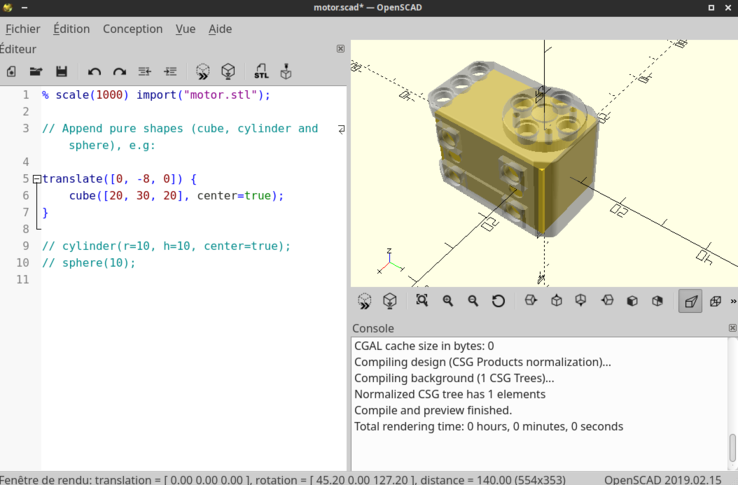
Editing the .scad file with the same name as the .stl file. Pure shapes present here will be used as approximation.
config.json entries
{
    // ...
    // General import options (see config.json documentation)
    // ...

    // Simplify STL meshes (default: false)
    "use_scads": true,
    // Can be used to enlarge/shrink the pure shapes (default: 0.0)
    "pure_shape_dilatation": 0.0
}
use_scads (default: false)
If set to true, the processor will use OpenSCAD pure shapes approximation (see above)
pure_shape_dilatation (default: 0.0)
A float that can be used to enlarge or shrink the pure shapes. This can be useful to avoid collisions between parts.
Use a negative value to shrink the shapes.